
Pregnancy Announcements 2026: Creative AI-Enhanced Ways to Share Your Big News
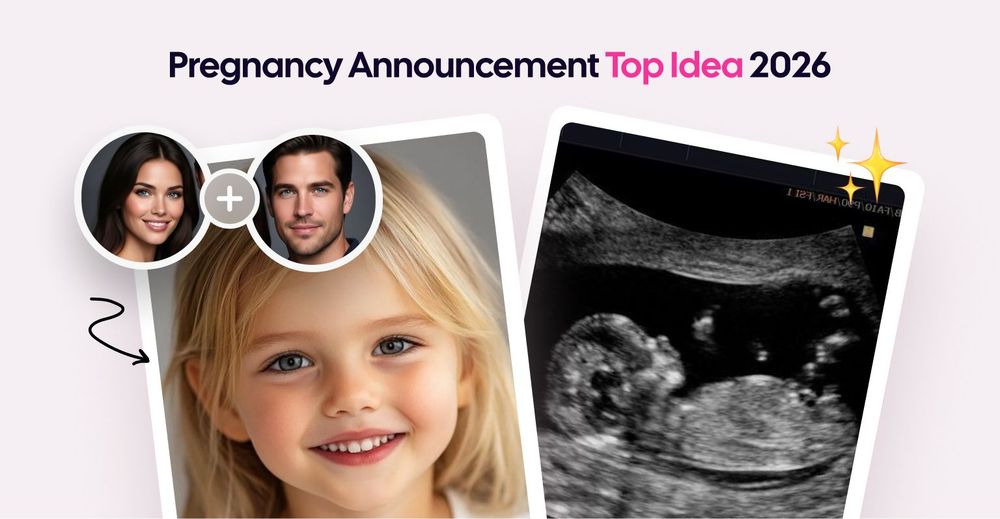
Illustrations are AI-generated
Have you just found out about your pregnancy? Congratulations to you! Now you want to announce it beautifully and excitingly in a way that makes all your relatives and friends remember this day forever. I have an idea of how to make your pregnancy announcement brilliant.
What Is a Pregnancy Announcement?
A pregnancy announcement is a joyful tradition where you share the exciting news of expecting a baby with family, friends, and followers. This can be done in a creative, elegant, or humorous manner, allowing you to express your emotions and share the happiness of this wonderful news.
Best Pregnancy Announcement Ideas
Old-school methods work - you can send your pregnancy test photo, or you can show your ultrasound scans, or make some T-shirts with the pregnancy announcement. However, in 2026, we have an entirely new format, and I assure you, it will make your pregnancy announcement much more emotional and effective - an AI-powered baby photo sharing feature for announcing that your family will be growing. Using this method, you will show your future baby portrait — both boy and girl variants (if you still don't know the gender, save this moment to share on a gender reveal party.
The effect of an AI-enhanced pregnancy announcement
The effect of this AI idea is so strong that you’ll see parents’ tears of joy, and your friends will be forwarding this message to chats and commenting something like "he will look like father" or "she will have your mother's eyes."
In this article, we’ll explore one of the most modern and emotional pregnancy announcement ideas — using an AI baby photo — and how to create it in just 10 minutes.
First things first - what you need right now is photos of both parents. You need accurate and sharp photos of the mother and father. Selfies, portraits, and even Instagram photos are OK. The most important thing is that the face should be well seen in the photo you input in the service. We have a separate guide on what the generator does to your photo before it starts.
For the baby visualization, you will need just several minutes. The process of generation in the service takes 2–3 minutes, and you will need maybe around 5 minutes to generate all the variants and choose one of the sweetest ones.
That's it. Nothing more than you will need for your pregnancy announcement.
Step 1: Upload Parent Photos
Visit our AI Baby Generator. Choose and upload photos, following the instructions from our guide.
Step 2: Adjust Settings (Gender, Features)
Now set the parameters for your future child. For pregnancy announcements, "newborn" works best. It's more touching — people see the baby they will soon meet.
Step 3: Generate Baby Face
The AI will begin its work. Wait several minutes, and get a result where people see a glimpse of your family’s future, not just the news.
Step 4: Download & Share
The photo is ready. Now download it.
How to use AI for a pregnancy announcement
Instagram Post - Post the photo with caption: "Meet our little one... coming [month, year] 💙" or "Our future looks like this. Baby [last name] arriving soon"
Direct surprise for your family - Send a photo to your loved ones in a private message with the text: "Meet your grandson/granddaughter. See you in April."
Print out - Order a 10×15 cm photo print. Give it to your grandparents in person. The effect will be stronger — they will be holding a portrait of their future great-grandchild in their hands.
Top 15 captions and messages for pregnancy announcement enhanced with an AI photo
Pregnancy Announcement Captions For Family
Our hearts are fuller than ever before. Meet Baby (your surname) coming soon!
We're so excited to introduce you to our little one. Arriving in (month).
We can't wait for you all to meet our newest addition. Here’s what we’re expecting!
Preparing for our new chapter as parents. Get ready for cuteness overload!
It's finally happening—we're becoming parents! Say hello to Baby (surname)!
Pregnancy Announcement Messages For Friends
1. Let the diaper jokes begin! Introducing Baby (surname) in (month).
2. Just when life couldn't get any more fun, we're adding another member to our crew in (month of birth).
3. Brace yourself—this kid's gonna steal everyone's heart in (month).
4. Prepare for chaos, laughter, and endless cuddles. Baby alert incoming!
5. Time to level up our friend group by welcoming Baby (surname) into it.
Pregnancy Announcement Text For Instagram Followers (engaging yet professional touch):
1. So happy to share some big news! Expecting our little miracle in (month).
2. What started as two became three—and now four! Here's what's cooking...
3. Life just got sweeter. Look forward to meeting Baby (surname) very soon.
4. From dreaming to planning—here comes Baby (surname), making our lives complete.
5. With love, hope, and excitement, introducing our upcoming (month) arrival.
Pregnancy Announcement Tips
You have the AI photo. Now you need to share it correctly. Here are 20 practical tips to make your pregnancy announcement memorable.
Timing Tips
Wait until you feel ready - Some people announce at 8 weeks. Others wait until 12 weeks or later. There's no perfect time. Choose when you feel comfortable.
Tell close family first - Call your parents before posting on Instagram. They'll appreciate hearing it personally, not from a social media post.
Pick the right moment - Announce during family dinner, on a birthday, or on a regular Tuesday. What matters is that you feel good about it, not the date.
Format Tips
Keep it simple - A good photo and one sentence work better than a long caption. "Baby Smith coming March 2026" is enough.
Use your AI baby photo strategically - Don't just post the photo. Add context: "Meet our little one... arriving soon" or "Can't wait to meet this face."
Make it personal - Add something that reflects you. Love books? Take a photo with baby shoes on a bookshelf. Love hiking? Announce at your favorite trail.
Content Tips
Show emotion, not perfection - Real smiles beat posed photos. Authenticity connects better than staged perfection.
Include your partner - If you're announcing together, make sure both people appear in the photo or post. It's a shared moment.
Add a due date (or don't) - "Coming Spring 2026" gives people context without exact details. Some prefer privacy — that's fine too.
FAQ
When Should You Announce Your Pregnancy?
The best time to announce your pregnancy depends largely on personal preference and circumstances. However, many couples choose to do so after passing the first trimester (around week 12 or 13), once they have had an initial scan confirming a healthy pregnancy. Some might prefer earlier if there’s strong family support or medical reasons requiring early disclosure. Others may wait until later stages due to privacy concerns or simply wanting to enjoy the experience privately initially.
Will my child look the same as when generated by AI?
There is a 50% chance, yes, but also a 50% chance that it will not. AI shows a probable outcome based on the parents' traits. However, genetics is unpredictable:
- A child may inherit traits from their grandparents.
- Eye and hair color may change during the first years of life.
- The shape of the face changes as it grows.
Consider the photo as an artistic concept rather than an accurate prediction.
How much does it cost to create an AI photo of a child?
Some services offer 1–2 free generations, while AI Baby Generator has a free generation period of 3 days with no limits, which is very convenient for pregnancy announcements.
Try It Now
A pregnancy announcement is an important moment. You share your joy, excitement, and anticipation. AI baby photos add an emotional image to this — people see not just the news, but the future person.
Try it. You'll be surprised by the result.
Create Your AI Baby Photo Now →